9 Best Cameras for Live Streaming YouTube in 2027
For high-quality YouTube live streaming in 2027, you want cameras that deliver sharp, reliable performance. Options like the EMEET PIXY stand out with AI-powered dual-lens tracking and crisp 4K video. Meanwhile, the EMEET S600 impresses with its fast PDAF autofocus and a high-quality Sony sensor.
The 5K UHD Vlogging Camera offers superb resolution and even night vision, perfect for streaming in low light. On the other hand, the NearStream VM20 shines with a powerful 40X zoom and remote control features. If you prefer something lightweight and wireless, the Logitech Mevo Start adds great convenience.
Keep exploring these options to find the perfect camera that matches your streaming style and setup. Whether you prioritize zoom, autofocus, or portability, there’s a great choice for every YouTuber in 2027.
| Image | Name | Editor's Rating | Price |
|---|---|---|---|

|
|
||

|
|
||
|
|
||

|
|
||

|
|
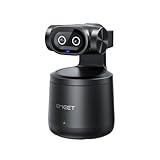
EMEET PIXY Dual-Camera AI-Powered PTZ Camera 4K with Tripod, AI Tracking
No products found.
Experience seamless live streaming with the EMEET PIXY Dual-Camera AI-Powered PTZ Camera 4K. This camera uses ultra-fast 0.2s PDAF autofocus combined with AI face-position detection to keep your image sharp and clear. Its intelligent tracking ensures smooth, dynamic shots without manual adjustments.
The flexible design offers a wide 310° pan and 180° tilt range, allowing you to capture every angle effortlessly. The 3-mic array with noise-canceling modes enhances audio clarity, making communication crisp even in noisy environments. Its adjustable tripod adds convenience for various setups.
Designed for easy maintenance, the camera connects directly to your PC or Mac for recording, eliminating the need for onboard storage. While the field of view is fixed at certain resolutions, this balance supports consistent video quality during streaming or presentations.
Overall, the EMEET PIXY is ideal for live streaming, teaching, or fitness demos. Its AI-powered features solve common challenges in video capture, providing smooth tracking and clear sound for professional results.
Best for: content creators, educators, and fitness instructors who need a versatile 4K PTZ webcam with fast autofocus and intelligent tracking.
What We Like:
- Fast 0.2s PDAF autofocus with AI face-position detection for sharp images
- Wide pan (310°) and tilt (180°) with smooth AI tracking
- Clear audio from 3-mic array with noise cancellation
- Adjustable tripod for flexible positioning
Specification:
| Feature | Details |
|---|---|
| Manufacturer | EMEET |
| Dimensions | Not specified |
| Weight | Not specified |
| Camera Resolution | 4K Ultra HD |
| Pan Range | 310° |
| Tilt Range | 180° |
| Microphones | 3-mic array |
| Connectivity | USB (PC/Mac) |
| Tripod | Adjustable included |
EMEET S600 4K Webcam for Streaming, Sony 1/2.55” Sensor, PDAF Autofocus
- Unmatched 4K Streaming Quality - The EMEET S600 streaming camera boasts a high-definition 4K sony 1/2.55'' sensor...
- Advanced PDAF Autofocus & Light Balance – 4K webcam S600's PDAF(Phase Detection Autofocus) tech offers significant...
- Enhanced Audio Clarity & Customizable FOV - The EMEET S600 4K streaming webcam is equipped with premium microphones that...
Experience crisp, true 4K video quality with the EMEET S600 4K Webcam, designed to elevate your streaming and video calls. Its advanced Sony 1/2.55” sensor captures vibrant and clear images, while the PDAF autofocus ensures your focus remains sharp and smooth without lag.
This webcam solves common streaming frustrations like blurry or shaky video. The digital image stabilization keeps your shots steady, even if your setup isn’t perfectly still. You can switch between 4K at 30 FPS or 1080p at 60 FPS, adapting the video quality to your needs.
Built for convenience, the EMEET S600 includes dual noise-canceling microphones that reduce background noise, providing clearer audio. Its compact design features a privacy cover and flexible mounting options, making it easy to install on laptops or monitors.
Maintenance is simple due to its durable build and straightforward software controls through EMEETLINK. While it doesn’t support Windows Hello facial recognition and may face some Chrome OS compatibility issues, its performance for streaming remains excellent.
Best for: Content creators and professionals seeking high-resolution 4K streaming with reliable autofocus and customizable settings.
What We Like:
- Sharp 4K video at 30 FPS and smooth 1080p at 60 FPS with PDAF autofocus
- Dual noise-canceling microphones effectively reduce background noise
- Compact design with privacy cover and versatile mounting options
Specification:
| Feature | Details |
|---|---|
| Manufacturer | EMEET |
| Sensor Type | Sony 1/2.55” CMOS |
| Autofocus | PDAF (Phase Detection) |
| Video Resolution | 4K @ 30 FPS, 1080p @ 60 FPS |
| Field of View | 73° |
| Zoom | 2.1x digital zoom |
| Microphones | Dual noise-canceling |
| Dimensions (approx.) | Compact (exact size not specified) |
| Additional Features | Privacy cover, EMEETLINK software |
5K UHD Vlogging Camera with Night Vision
- 【5K Cinematic Clarity & Versatility】 This digital camera captures stunning 5K/20fps videos (also 4K/60fps) and 64MP...
- 【270° Pro Flip Screen & Durability】 This 5K Ultra HD video camera features a durable metal-hinge and 3.0" IPS touch...
- 【Ultimate Creator Bundle Included】 Start shooting immediately: 32GB Memory Card, dual 1800mAh batteries, tripod...
Capture every moment with clarity, day or night, using the 5K UHD Vlogging Camera with Night Vision. This camera is designed to help creators film sharp, high-resolution videos even in challenging lighting. Its advanced CMOS sensor ensures crisp images whether you’re shooting bright daylight scenes or dimly lit environments.
The camera offers 16× optical zoom and built-in optical stabilization, letting you get closer to the action while maintaining smooth footage. Night vision functionality expands your creative possibilities by capturing clear video in darkness without extra lighting. A 3″ rotatable touchscreen makes framing your shots intuitive and flexible.
Maintenance is simple thanks to its durable yet compact design. However, it is not water resistant, so extra care is needed during outdoor shoots in wet conditions. Connectivity via WiFi and USB streamlines content transfer and remote control, enhancing your workflow.
This camera is ideal for vloggers, live streamers, and content creators who want versatility and quality in a portable device. It comes with essential accessories including a microphone, tripod, and remote for ready-to-use convenience.
Best for: Content creators and vloggers needing high-resolution video and reliable night vision in a versatile, easy-to-use camera.
What We Like:
- Sharp 5K video and 64 MP photo capture
- IR night vision expands shooting options
- Optical stabilization for smooth video
- Includes microphone, tripod, and remote
- WiFi and USB connectivity for easy sharing
Specification:
| Feature | Details |
|---|---|
| Manufacturer | — |
| Video Resolution | 5K at 20 fps, 4K at 60 fps |
| Photo Resolution | 64 MP |
| Zoom | 16× optical |
| Screen Size | 3 inches, rotatable |
| Connectivity | WiFi, USB |
| Included Accessories | Microphone, tripod, remote |
| Weight | — |
| Water Resistance | No |
Logitech for Creators Mevo Start Wireless Live Streaming Camera – Black
No products found.
Experience effortless live streaming with the Logitech for Creators Mevo Start, a wireless camera designed to simplify your broadcasts. Its compact design makes it easy to carry and set up anywhere, allowing you to focus on your content without worrying about complicated wiring.
This camera delivers crisp 1080p HD video with a prime lens and 4x digital zoom, ensuring your streams look professional and clear. The Auto-Director app lets you control the camera smoothly, making multi-camera productions simple and intuitive.
Connectivity is flexible, supporting Wi-Fi, Ethernet, and smartphone tethering. You can even link up to three Mevo Start cameras for dynamic multicam streams. With up to six hours of battery life and microSD recording, it’s ideal for creators on the move.
Maintenance is straightforward; just keep the lens clean and charge the battery regularly to ensure optimal performance. However, note that the fixed focus lens and limited water resistance may restrict some shooting scenarios.
Best for: Content creators and live streamers seeking a compact, wireless camera with high-quality 1080p streaming and multicam capabilities for platforms like YouTube and Twitch.
What We Like:
- Clear 1080p HD video with prime lens and 4x digital zoom
- Versatile wireless connectivity including Wi-Fi, Ethernet, and tethering
- Supports multicam setups with up to three cameras controlled via app
- Long battery life of up to six hours for extended streaming
- Easy to maintain with simple charging and lens care
Specification:
| Feature | Details |
|---|---|
| Manufacturer | Logitech |
| Dimensions | Compact, portable size |
| Weight | Lightweight |
| Material | Durable plastic casing |
| Color Options | Black |
EMEET PIXY Wireless 4K Dual-Lens AI Tracking Streaming Camera
- Crisp 4K Quality & AI Dual-Camera Design:Capture stunning UHD 4K footage with vibrant, true-to-life colors. The...
- Smart Auto-Tracking & Gesture Control:Advanced AI algorithms automatically detect and follow your movement in real...
- Wireless Freedom & One-Stream Multi-Platform:Connect to your phone or PC without messy cables, and place the camera...

Capture every moment with ease using the EMEET PIXY Wireless 4K Dual-Lens AI Tracking Streaming Camera. This camera is designed to follow your movements smoothly, so you stay perfectly framed whether you’re presenting or creating content. Its advanced AI technology tracks you in real time, eliminating the need for manual adjustment.
The dual-lens design combines a sharp 4K UHD video lens with a dedicated AI tracking lens, ensuring your image stays clear and focused even during fast motion. You can operate it hands-free with intuitive gesture controls, making it ideal for multitasking or active streaming sessions.
This lightweight, clip-on camera offers up to 8 hours of battery life, reducing interruptions during long streams or meetings. Wireless connectivity allows you to link multiple cameras through EMEET STUDIO for versatile, multi-platform streaming setups. The built-in microphone and HDR support enhance audio and video quality.
Maintenance is simple thanks to its durable design, but keep in mind it is not water resistant and best suited for indoor use. The fixed focus lens works well for general streaming but may not capture detailed close-ups. Also, it performs best within a moderate temperature range up to 40 °F.
Best for: content creators, live streamers, and remote workers who need reliable AI tracking and wireless multi-camera streaming for dynamic video production.
What We Like:
- Smooth, real-time AI tracking with dual lenses for precise subject following
- Wireless multi-camera control via EMEET STUDIO for flexible streaming setups
- Long-lasting battery life of up to 8 hours and lightweight clip-on design
- Hands-free operation with gesture controls for ease during streams
- HDR support and built-in microphone for enhanced audio and video quality
Specification:
| Feature | Details |
|---|---|
| Manufacturer | EMEET |
| Dimensions | Compact, clip-on design |
| Weight | Lightweight |
| Video Resolution | 4K UHD |
| Battery Life | Up to 8 hours |
| Connectivity | Wireless, multi-camera support |
| Operating Temp. | Up to 40 °F |
| Special Features | Dual-lens AI tracking, gesture control, HDR support |
NearStream VM33 Gen 3 Wireless Streaming Camera, 10X Optical Zoom, 1-Pack
- 40X Zoom and 2K Video: The 1-pack includes a VM33 camera. Stream in 1080p; record in 1440p. Use 40X hybrid zoom (10x...
- 6-Hour Battery and Flexible Connections: Stream for up to 6 hours over Wi-Fi or AP hotspot mode, use USB-C webcam mode...
- RTMP, RTSP, and NDI Streaming: Stream with one tap from the NearStream app to YouTube, Facebook, or Twitch, or use a...
The NearStream VM33 Gen 3 Wireless Streaming Camera delivers sharp, close-up shots with its 10X optical zoom and 40X hybrid zoom. This feature allows you to capture detailed video without losing clarity, perfect for live streaming or recording events. Its compact design includes a 2.7-inch 2K display that makes framing shots straightforward.
Audio quality is enhanced by an 8-MEMS microphone array with AI noise suppression, ensuring clear sound even in noisy environments. You can also connect external microphones for added flexibility. The camera’s battery supports up to 6 hours of continuous use, so you can stream or record without frequent interruptions.
Connectivity options like Wi-Fi, USB-C, and app control make managing your streams easier. The camera supports multi-camera setups, allowing creative users to produce dynamic content across platforms such as YouTube, Facebook, and Twitch. However, Ethernet connection requires a separate adapter, and multi-camera setups need multiple units.
Maintenance is simple with standard charging and easy cleaning of the lens and microphone array to keep your camera performing at its best. This camera is designed for content creators seeking a balance of portability, versatility, and high-quality streaming.
Best for: Content creators and live streamers needing versatile wireless video and audio capture with multi-camera support on popular streaming platforms.
What We Like:
- Crisp close-ups with 10X optical zoom and 40X hybrid zoom
- Clear audio via 8-MEMS microphones and AI noise suppression
- Flexible connectivity including Wi-Fi and USB-C with app control
- Up to 6 hours battery life for extended use
Specification:
| Feature | Details |
|---|---|
| Manufacturer | NearStream |
| Dimensions | Not specified |
| Weight | Not specified |
| Display | 2.7-inch 2K screen |
| Optical Zoom | 10X |
| Hybrid Zoom | 40X |
| Microphone | 8-MEMS array with AI noise suppression |
| Battery Life | Up to 6 hours |
| Connectivity | Wi-Fi, USB-C, app control |
EMEET Prime SE 4K Dual-Lens Live Streaming Camera, 1-Inch Large Sensor
- 1-Inch Large Sensor: See Clearly in Any Light. The 1-inch sensor captures 4× more light than standard webcam sensors...
- 4K@30fps + Software HDR: Crisp and Balanced. 3840×2160 resolution at 30fps with software HDR to balance bright windows...
- 12x Hybrid Zoom + PDAF Auto Focus: Show, Don't Just Tell. Optical zoom combined with digital delivers 12× total. Push...
Experience ultra-clear live streaming with the EMEET Prime SE 4K Dual-Lens Live Streaming Camera. Its 1-inch CMOS sensor captures four times more light than standard webcams, delivering vivid and sharp video even in low-light environments. This means your streams will look professional without extra lighting setups.
The camera records in crisp 4K resolution at 30 fps with HDR, balancing highlights and shadows for natural-looking footage. Fast PDAF autofocus locks focus in just 0.2 seconds, so your image remains sharp and lag-free as you move. The 12× hybrid zoom helps frame your shots perfectly from close-up to several meters away.
Designed for convenience, it offers dual HDMI and USB-C outputs for flexible connectivity. The included remote lets you adjust zoom and exposure on the fly, simplifying live production without needing to touch the camera.
Maintenance is straightforward, but note that the remote uses nonstandard batteries, which might require occasional special replacements. While the optical zoom maxes out at 2×, digital zoom extends your reach, though with some image quality trade-off.
Best for: professionals and content creators who need reliable, high-quality 4K live streaming with fast autofocus and versatile zoom options.
What We Like:
- Large 1-inch sensor enhances image quality in varied lighting
- Rapid 0.2-second PDAF autofocus keeps video sharp
- Dual HDMI and USB-C outputs provide flexible connections
- Remote control enables easy zoom and exposure adjustments
Specification:
| Feature | Details |
|---|---|
| Manufacturer | EMEET |
| Sensor Size | 1 inch CMOS |
| Video Resolution | 4K at 30 fps |
| Zoom | 12× hybrid (2× optical) |
| Connectivity | HDMI, USB-C |
| Autofocus | PDAF, 0.2 seconds |
| Remote Control | Included (nonstandard batteries) |
NearStream VM20 4K Streaming Camera with 40X Hybrid Zoom and Remote Control
No products found.
Elevate your live streaming with the NearStream VM20 4K Streaming Camera, designed to deliver crisp visuals and smooth control. Its 40X hybrid zoom, blending 8X optical with 5X digital zoom, lets you effortlessly switch between wide shots and close-ups without losing clarity. This flexibility enhances your production’s visual storytelling, making every frame count.
The camera outputs stunning 4K video at 30fps and fluid 1080p at 60fps, supported by autofocus and optical image stabilization. These features ensure your footage remains sharp and steady, even during dynamic movements. Remote pan, tilt, and zoom controls simplify multi-camera setups, saving time and effort during live broadcasts.
Audio quality is equally prioritized with eight built-in MEMS microphones combined with AI noise-canceling technology. This setup captures clear sound, minimizing background distractions for a professional streaming experience. Connectivity options include USB-C, HDMI, and Ethernet with RTSP, enabling seamless integration with popular streaming platforms.
Maintenance remains straightforward thanks to its compact, robust design weighing 550g. However, it is not water-resistant and is slightly bulkier than typical webcams, which may affect portability. It’s ideal for indoor use in controlled environments.
Best for: Streamers, educators, and professionals needing high-quality 4K video with flexible zoom and remote control for dynamic live production and multi-camera setups.
What We Like:
- Extensive 40X hybrid zoom for versatile framing options
- High-quality 4K/30fps and 1080p/60fps video with stabilization
- Remote pan, tilt, and zoom controls for flexible operation
- Eight MEMS mics with AI noise-canceling for clear audio
- Multiple connectivity options including USB-C, HDMI, and Ethernet
Specification:
| Feature | Details |
|---|---|
| Manufacturer | NearStream |
| Dimensions | Compact size (exact size not specified) |
| Weight | 550g |
| Color | Black |
| Video Resolution | 4K at 30fps, 1080p at 60fps |
| Zoom | 40X hybrid (8X optical + 5X digital) |
| Audio | 8 MEMS microphones with AI noise-canceling |
| Connectivity | USB-C, HDMI, Ethernet with RTSP support |
Zoom Q8n-4K Video Recorder for Musicians, Streamers & Filmmakers

- 4K VIDEO WITH FOUR-TRACK AUDIO – Capture stunning 4K video at 30fps alongside up to four simultaneous audio tracks...
- 150 WIDE-ANGLE LENS, FIVE FOV SETTINGS – The F2.8 wide-angle lens with scene presets for indoor, outdoor, nighttime...
- TWO XLR INPUTS WITH PHANTOM POWER – Connect microphones, instruments, or run directly from a mixing board for...
Step up your live streaming and content creation with the Zoom Q8n-4K Video Recorder. Designed for musicians and filmmakers, it captures stunning 4K UHD video at 30 fps using a wide-angle F2.8 lens. This ensures your videos have vibrant clarity and a broad field of view to capture every detail.
The recorder solves common audio challenges by offering four simultaneous audio tracks, built-in stereo microphones, and dual XLR inputs with phantom power. This setup lets you record professional-quality sound without needing extra gear. Its compact design features a flip-out 3.5-inch screen and webcam mode, making it easy to monitor and stream directly.
Maintenance is simple with local SD card recording supporting up to 512 GB. Its lightweight and portable frame allow you to take it anywhere without hassle. However, it uses a single AA battery, which might require frequent replacements compared to rechargeable options.
Best for: Musicians, streamers, and filmmakers needing a portable, high-quality 4K video recorder with advanced audio for live streaming and content creation.
What We Like:
- Crisp 4K video capture with wide-angle lens and scene presets
- Professional-grade audio with four tracks and dual XLR inputs
- Lightweight design with flip-out screen and versatile webcam mode
- Supports large SD cards for extended recording sessions
Specification:
| Feature | Details |
|---|---|
| Manufacturer | Zoom |
| Video Resolution | 4K UHD at 30 fps |
| Lens | F2.8 wide-angle, 150° field |
| Audio Inputs | Built-in stereo mics, 2 XLR with phantom power |
| Screen | 3.5-inch flip-out |
| Storage | SD card up to 512 GB |
| Power | 1 AA battery |
| Weight | Lightweight (exact weight not specified) |
Factors to Consider When Choosing a Camera for Live Streaming YouTube
When choosing a camera for live streaming YouTube, you’ll want to focus on video resolution and autofocus speed to keep your stream sharp and smooth. Don’t forget to check zoom capabilities and audio quality to guarantee your content looks and sounds professional.
Also, make sure the camera offers the right connectivity options for your setup. After all, having the right ports and wireless features can make your streaming experience much easier and more reliable.
Video Resolution Importance
Choosing the right video resolution plays a crucial role in the quality and performance of your live stream on YouTube. While 4K captures stunning detail and allows for cropping or zooming, it demands much higher bitrates—typically 15–30+ Mbps—and stronger hardware.
Most streams comfortably run at 1080p60 for smooth motion or 720p30 when bandwidth is limited, balancing clarity and accessibility. Remember, many viewers can’t handle 4K streams, and platforms often downscale them, so streaming in 1080p with a high-res source can improve VOD quality.
Higher resolutions also increase CPU load and storage needs, so you need to match your resolution choice with your upload speed, encoding power, and lighting setup. This way, you deliver the best experience without overloading your system.
Autofocus Speed Benefits
Although many factors influence live stream quality, autofocus speed plays a critical role in keeping your content sharp and engaging. Faster autofocus, like phase-detect systems locking in around 0.2 seconds, drastically reduces visible hunting and keeps your subject in focus during quick movements or framing changes.
This means your viewers experience smooth, uninterrupted visuals, especially in dynamic streams like fitness or live demos. Low-latency autofocus preserves sync between motion and focus, preventing distracting lag or sudden shifts.
You want reliable autofocus across various distances—from close-ups to wider shots—so you won’t need constant manual adjustments. Cameras that combine fast AF with predictive or subject-tracking algorithms deliver smoother shifts and fewer dropped-focus moments when you move or change posture.
That way, your live stream stays professional and engaging throughout.
Zoom Capabilities Needed
Fast and reliable autofocus keeps your live stream sharp, but zoom capabilities shape how you frame and present your content. For talk-style streams, a modest 1–3× optical zoom is enough since your subject stays close.
If you’re streaming events or performances, opt for higher optical zoom (5–10× or more) to maintain image quality when capturing distant action. Always choose optical zoom over digital to avoid resolution loss when reframing or following subjects far away.
Match your zoom range to your venue size—wider fields of view suit small rooms, while large venues demand stronger zoom. Look for smooth, motorized or remote-controlled zoom to avoid jerky shifts.
If you’re multicam switching or doing live replays, consistent zoom ratios across cameras help keep your visuals seamless and easier to manage. Makes everything flow better, right?
Audio Quality Features
When you stream live on YouTube, audio quality can make or break your viewer’s experience. Prioritize cameras that support external microphone inputs like 3.5mm, USB-C, or XLR via adapters. Onboard mics often capture unwanted room echo and lack voice clarity.
Look for cameras with dual or multi-mic arrays featuring directional or beamforming tech. These help enhance speech and reduce background noise. It really makes a difference when you want your voice to come through clearly.
Check if your camera offers selectable audio modes or noise suppression. This lets you balance ambient sounds and noise removal better. Also, verify support for sample rates (44.1–48 kHz) and formats like AAC or PCM.
Plus, make sure there’s clean, low-latency audio output over USB or HDMI. And don’t forget to consider power options and dedicated audio monitoring. That way, you can catch clipping or dropouts during streams before your audience does.
Connectivity Options Available
Clear audio is only part of the equation; how your camera connects to your streaming setup can greatly impact your broadcast quality and ease of use.
USB webcams offer simple plug-and-play via USB-C or USB-A, perfect for quick setups but may limit resolution and frame rates.
For higher quality, HDMI output from DSLRs or mirrorless cameras delivers uncompressed, low-latency video but requires a capture card.
Ethernet options like NDI or RTSP/IP support reliable, long-distance streaming with remote control, ideal for multi-camera setups.
Wireless streaming via Wi-Fi or RTMP offers mobility but risks latency and packet loss.
Cameras with built-in HDMI passthrough or direct RTMP/NDI streaming can streamline workflows by cutting out extra hardware and minimizing latency, giving you a smoother, professional broadcast experience.
Portability and Size
How portable does your streaming setup need to be? If you want handheld ease, travel-friendly gear, or quick setups, choose smaller, lightweight cameras under about 1 pound. Look for integrated batteries or models offering 6–8 hours of use to avoid relying on AC power or bulky power banks.
Cameras with standard 1/4″ screw mounts give you flexibility to clip onto laptops, tripods, gimbals, or stands. Foldable or detachable accessories like built-in screens and removable cables shrink your packed size and speed up deployment.
Wireless options like Wi-Fi streaming or USB webcam mode free you from cables, but be mindful of possible range limits, connection stability, and latency issues. Prioritizing portability and size guarantees your streaming gear fits your lifestyle and shooting style.
Software Compatibility Factors
Because your streaming experience depends heavily on seamless integration, you’ll want to make sure your camera supports UVC or standard webcam modes for plug-and-play compatibility with popular streaming software like OBS, Streamlabs, and YouTube Live.
Check that the camera’s output formats and frame rates, such as 4K@30fps or 1080p@60fps, match what your software and capture setup can handle to avoid dropped frames or forced downscaling.
Verify video codecs like MJPEG, YUY2, or H.264 are supported and compatible with your encoder settings to guarantee low latency.
Also, confirm driver availability across your OS—Windows, macOS, Linux, or mobile—so features like autofocus work smoothly.
Finally, if you plan multi-camera setups, ensure your camera supports NDI, RTSP, HDMI, or USB switching compatible with your streaming platform for easy scene control.
Frequently Asked Questions
How Do I Improve My Internet Speed for Better Live Streaming Quality?
You can improve your internet speed by using a wired Ethernet connection and upgrading your router. These simple changes can make a big difference in your streaming quality.
Also, try limiting other device usage and closing background apps. It helps free up bandwidth so your stream runs smoother.
And hey, don’t forget to check if you’re on the right plan. Choosing a higher-speed package from your provider can really boost your internet performance.
What Lighting Setup Works Best for Youtube Live Streams?
You’ll want soft, even lighting to avoid harsh shadows. Use a key light at 45 degrees, a fill light opposite it, and a backlight to separate you from the background.
LED panels with adjustable color temperature work great. They let you tweak the warmth or coolness to suit your mood and setting. Trust me, it makes a big difference on camera!
Can I Use My Smartphone as a Live Streaming Camera?
Yes, you can use your smartphone as a live streaming camera. Just make certain it has a good camera and a stable internet connection.
You can use apps like Streamlabs or OBS to help with the streaming. Proper lighting and a tripod will really boost your stream quality.
It’s pretty easy once you get the hang of it!
What Are the Best Audio Accessories for Live Streaming?
You’ll want a lavalier mic for clear voice capture, a shotgun mic to cut background noise, and an audio interface for crisp sound.
Don’t forget headphones to monitor—your viewers will thank you for the professional audio quality!
How Do I Protect My Live Stream From Unauthorized Access?
You can protect your live stream by enabling password protection and using private or unlisted stream settings. This way, only people you share the link or password with can access your content.
Also, activating two-factor authentication adds an extra layer of security. It helps prevent unauthorized access even if someone gets hold of your password.
Don’t forget to regularly update your streaming software too. Keeping it up to date helps patch security vulnerabilities and keeps your content safe.
Conclusion
When choosing your live streaming camera, remember it’s not just about specs but how it fits your unique style and setup. While high resolution and AI features seem like must-haves, real-world performance like autofocus reliability and ease of use often matter more during streaming.
Don’t fall for flashy numbers alone—test how the camera handles your environment. This balance guarantees you deliver smooth, engaging content that keeps your audience coming back.
In the end, the best cameras for live streaming on YouTube in 2027 are those that blend technical quality with practical usability. Focus on cameras that offer consistent autofocus, great low-light performance, and seamless connectivity. These features help you create professional-looking streams that captivate viewers every time. Remember, your streaming setup should enhance your style and workflow to make your content stand out in a crowded space.