1 Best Camera Settings for iPhone 14 Photography Tips in 2027
To capture stunning photos with your iPhone 14 in 2027, it’s essential to master the best camera settings for iPhone 14 photography.
Start by using night mode in low light to bring out amazing details and colors. Adjust exposure compensation carefully to avoid overexposure in bright scenes—this little trick makes a big difference.
Pair these settings with versatile lenses like wide-angle or macro from the Godefa 14-in-1 kit to take your shots to the next level. These lenses let you get creative and capture unique perspectives that stand out.
Don’t forget to balance colors using filters and use a selfie ring light for perfect lighting on your portraits.
Keep experimenting with composition and post-processing techniques, and you’ll unlock even more photography mastery over time. Have fun shooting!
| Image | Name | Editor's Rating | Price |
|---|---|---|---|
|
|
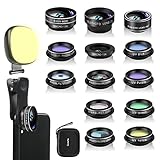
Godefa 14-in-1 Phone Camera Lens Kit
- 14 IN 1 Phone Camera Lenses Kit: This phone lens kits includes selfie ring light, 0.63X wide angle lens & 15X macro, 2X...
- The Better the Lens Quality, the Better the Result: All our phone camera lens attachment are crafted with finely...
- Unique Results: Wide-angle lens for capturing a broader scene, telephoto lenses for high-quality-zoom capabilities...
Transform your smartphone photography with the Godefa 14-in-1 Phone Camera Lens Kit, designed to unlock new creative possibilities. Whether capturing vast landscapes or intricate close-ups, this kit provides versatile lenses that help you achieve professional-looking shots easily.
The kit includes lenses from a 0.63X wide-angle to a 15X macro lens, allowing you to capture sweeping scenes or fine details with clarity. Unique filters like fisheye, kaleidoscope, and starburst add artistic effects, while the selfie ring light with adjustable brightness enhances low-light selfies and videos.
Each lens features finely processed glass that ensures sharp, distortion-free images. The clip-on design fits most smartphones, but keep in mind it may not secure well on all phone cases. Regular cleaning with a soft cloth will help maintain lens clarity and performance.
This lens kit is ideal for smartphone users who want to elevate their mobile photography with an easy-to-use, all-in-one solution that expands creative options and improves image quality.
Best for: Smartphone photographers seeking versatile lenses and creative filters to enhance everyday photography.
What We Like:
- Wide variety of lenses and filters for diverse shooting styles
- High-quality glass for clear, sharp images
- Compatible with many smartphones, including iPhone 14 and Android devices
- Adjustable selfie ring light for improved lighting in photos
- Compact, clip-on design for quick attachment and use
Specification:
| Feature | Details |
|---|---|
| Manufacturer | Godefa |
| Number of Lenses | 14 (including filters) |
| Lens Types | Wide-angle, macro, fisheye, etc. |
| Compatibility | iPhone 14, popular Android models |
| Material | Finely processed glass |
| Color Options | Blue, purple filters included |
Factors to Consider When Choosing Camera Settings iPhone 14 Photography Tips
When choosing your iPhone 14 camera settings, you’ll want to think about how lighting affects your shot. It’s also important to pick the right lens for the scene.
Paying attention to focus, exposure, and composition will help you capture sharper, more balanced photos. A little care here goes a long way.
And don’t forget, a bit of post-processing can really enhance your images even further. It’s like putting the finishing touch on your masterpiece!
Lighting Conditions Impact
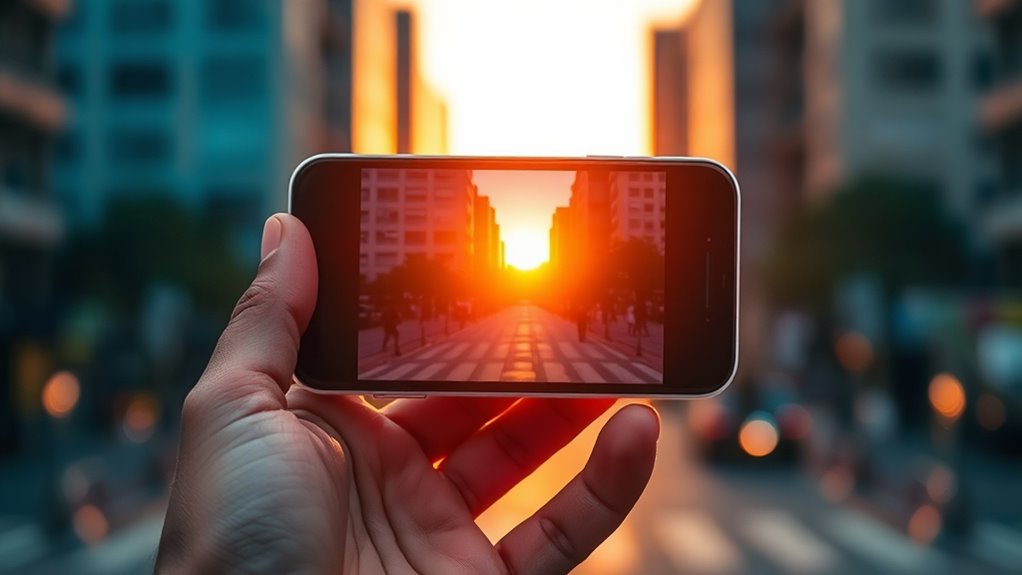
Because lighting profoundly affects your photos, understanding how to adjust your iPhone 14 settings for different conditions is essential. Natural light often gives the best results, especially during the golden hour just after sunrise or before sunset.
In low-light situations, switch to night mode to reduce noise and capture clearer details. When you’re dealing with bright lighting, avoid overexposure by adjusting the exposure compensation on your iPhone.
To combat glare and reflections, try using a polarizing filter—it boosts color saturation and contrast. If natural light isn’t enough, add artificial light, like a selfie ring light, which offers adjustable brightness to balance your scene perfectly.
Mastering these lighting tweaks will greatly improve your iPhone 14 photography results. Give them a try, and you’ll see the difference!
Lens Selection Importance
Selecting the right lens plays an essential role in shaping your iPhone 14 photos by offering various perspectives tailored to your subject. You can capture expansive landscapes with a wide-angle lens or immerse yourself in intricate details using a macro lens for close-ups.
When you need to get closer without physically moving, a telephoto lens lets you zoom in on distant subjects like wildlife or sports while maintaining image quality. If you want to add a creative twist, specialty lenses such as fisheye or starburst introduce unique effects that make your images stand out.
Focus And Exposure
Choosing the right lens sets the stage, but nailing focus and exposure brings your iPhone 14 photos to life. Tap your subject in the viewfinder to lock autofocus precisely where you want it, ensuring sharpness.
Then, adjust exposure by sliding your finger up or down on the sun icon near the focus square to control brightness, especially in tricky lighting. Take advantage of Night mode in low light, which automatically improves focus and exposure for clearer images.
Don’t forget to enable HDR to balance shadows and highlights, capturing more detail across your shot. While the iPhone 14’s computational photography does a great job, these manual tweaks let you personalize focus and exposure, making every photo uniquely yours.
Composition Techniques
When you frame your shot thoughtfully, your iPhone 14 photos will stand out with stronger visual impact. Use the rule of thirds by dividing your screen into nine equal parts and placing key subjects along these lines or intersections to balance your composition.
Try leading lines, like roads or pathways, to guide viewers’ eyes toward your subject and add depth. Incorporate natural frames—branches or doorways—to encase your subject and add context.
Notice symmetry and patterns around you; centering or highlighting them creates striking images. Don’t forget negative space—leave empty areas around your subject to emphasize it more clearly.
Post-Processing Adjustments
A few key post-processing adjustments can dramatically improve your iPhone 14 photos. Start by tweaking brightness and contrast to balance exposure, preserving details in both highlights and shadows.
Use color correction tools to adjust saturation and vibrancy, making your images reflect the scene more accurately. Apply sharpening filters to enhance fine details, especially in close-ups, but avoid adding noise.
Don’t forget to crop and straighten your shots to refine composition and highlight your subject. Following the rule of thirds really helps with better framing.
Finally, reduce noise in low-light photos to keep them clean and polished. These adjustments help you elevate your images beyond the initial capture, making your iPhone 14 photos truly stand out.
Frequently Asked Questions
How Do I Update My iPhone 14 Camera Software?
You can update your iPhone 14 camera software by going to Settings, tapping General, then Software Update. If an update’s available, just tap Download and Install.
Make sure you’re connected to Wi-Fi and have enough battery. That way, the update will go smoothly without any interruptions.
Can Third-Party Apps Improve iPhone 14 Photo Quality?
Third-party apps can definitely sharpen your iPhone 14’s photo game, like adding spices to a stew. They offer manual controls and filters that boost quality, giving you creative power beyond the default camera’s reach.
It’s like having a mini photo studio right in your pocket. These apps let you tweak settings and add effects that make your shots stand out even more.
What Accessories Help Stabilize iPhone 14 Shots?
You’ll want a sturdy tripod, a gimbal stabilizer, or even a grip with built-in stabilization to keep your iPhone 14 shots steady. These accessories help reduce shake, letting you capture crisp, professional-quality photos every time.
Trust me, once you start using them, your shots will look way better. It’s all about keeping things steady so your photos come out sharp and clear.
How to Clean iPhone 14 Camera Lenses Safely?
You should gently wipe your iPhone 14 camera lenses with a microfiber cloth. Avoid harsh chemicals and compressed air.
If needed, slightly dampen the cloth with water or lens cleaner made for optics. This helps prevent scratches or damage. Just take it easy and be gentle!
Does iPhone 14 Support RAW Photo Format?
Yes, your iPhone 14 supports RAW photo format through Apple ProRAW. You can enable it in Settings, giving you more control over editing by capturing uncompressed, high-quality images.
It’s perfect for professional-level adjustments and lets you bring out the best details in your shots. So, if you love tweaking your photos, this feature is definitely worth trying!
Conclusion
By mastering your iPhone 14’s camera settings, you’ll turn everyday moments into stunning snapshots, like painting with light and shadow. Remember, lighting is your brush, focus your palette, and composition your canvas.
With the Godefa 14-in-1 lens kit by your side, you’re equipped to capture magic from every angle. So, plunge into each shot with confidence and let your creativity dance through the lens—your best photos are just a tap away!
When you combine the right camera settings with the versatile Godefa lens kit, your iPhone 14 photography skills will soar. Whether it’s vibrant landscapes, crisp portraits, or artistic close-ups, you’ve got the tools to make every photo pop. Just keep experimenting, trust your eye, and enjoy the process. Your journey to stunning iPhone 14 photos starts now!