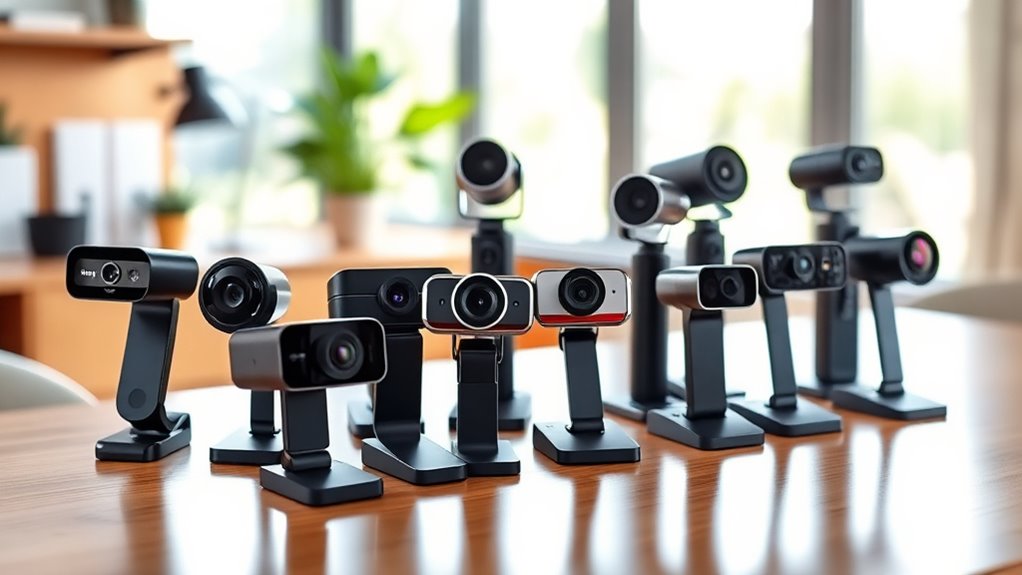
11 Best Camera Webcams for 2027
You’ll want a webcam that offers sharp video and clear sound, like the Logitech Brio 101 with Full HD 1080p and noise-reducing mics. A quality camera webcam can make all the difference in your video calls, streaming, or online meetings.
It’s about more than just resolution—it’s about smooth, reliable performance.
For higher resolution, the Anker PowerConf C200 offers 2K video with adjustable angles, while the NIVEOLI delivers ultra 4K clarity. Many models include privacy covers for security and plug-and-play USB compatibility for easy setup.
These features make your experience hassle-free and secure.
Keep these features in mind, and you’ll find the perfect webcam for smooth communication in 2027—and there’s more to explore about each option.
Whether you’re working from home or connecting with friends, the right webcam can truly elevate your video experience.
| Image | Name | Editor's Rating | Price |
|---|---|---|---|

|
|
||

|
|
||

|
|
||

|
|
||
|
|
Logitech Brio 101 Full HD 1080p Webcam for PC, Built-in Mic, Black
- Compatible with Nintendo Switch 2’s new GameChat mode
- Auto-Light Balance: RightLight boosts brightness by up to 50%, reducing shadows so you look your best—compared to...
- Privacy with a Slide: The integrated webcam cover makes it easy to get total, reliable privacy when you're not on a...
Experience sharp, clear video with the Logitech Brio 101 Full HD 1080p webcam, designed to enhance your virtual presence. This webcam tackles common issues like poor lighting and muffled audio, ensuring you look and sound professional during every call.
Its built-in microphone delivers clear sound, reducing background noise for better communication. The webcam’s RightLight technology boosts brightness by up to 50%, cutting down shadows and making you stand out on screen. Connecting is straightforward with USB-A, compatible with popular platforms like Zoom, Microsoft Teams, and Google Meet.
Maintenance is simple thanks to the integrated privacy shutter, which protects your privacy when the camera is not in use. Its lightweight, sleek black design fits seamlessly into any workspace without taking up much room or causing clutter.
The Logitech Brio 101 is ideal for remote workers and professionals who need reliable video and audio quality for daily virtual meetings. While the 60-degree viewing angle may be narrow for some setups, its performance and ease of use make it a solid choice.
Best for: Professionals and remote workers seeking a high-quality webcam with excellent video and audio clarity for virtual meetings.
What We Like:
- Crisp Full HD 1080p video with enhanced brightness
- Built-in microphone for clear audio during calls
- Privacy shutter for added security
- Easy USB-A connectivity with major video platforms
Specification:
| Feature | Details |
|---|---|
| Manufacturer | Logitech |
| Resolution | Full HD 1080p |
| Connectivity | USB-A |
| Color | Black |
| Viewing Angle | 60 degrees |
| Microphone | Built-in |
1080P HD USB Webcam with Microphone and Privacy Cover
- 【1080P HD Clarity with Wide-Angle Lens】Experience exceptional clarity with the Shcngqio TWC29 1080p Full HD Webcam...
- 【Noise-Reducing Built-In Microphone】Our webcam is equipped with an advanced noise-canceling microphone that ensures...
- 【Automatic Light Correction Technology】This cutting-edge technology dynamically adjusts video brightness and color...
Experience sharp, clear video calls and streaming with the 1080P HD USB Webcam. This webcam solves common issues like poor lighting and unclear audio, making your online interactions more professional and enjoyable. Its built-in noise-canceling microphone captures your voice clearly, even in noisy environments.
Equipped with a 1/2.9 CMOS sensor, it delivers vibrant Full HD 1080P images at a smooth 30fps. Auto light correction adjusts exposure and color automatically, ensuring you look your best in any setting. You won’t need extra lighting or complicated setup to get great video quality.
The slide-on privacy cover offers peace of mind by protecting your privacy when the webcam is not in use. Its eco-friendly materials provide durability and energy efficiency, reducing environmental impact without sacrificing performance. Maintenance is simple — just keep the lens clean and the cover closed when idle.
This plug-and-play webcam connects easily via USB 2.0, 3.0, or 3.1, with a 5ft cable and adjustable clip for stable mounting on monitors or laptops. Though it lacks zoom and manual focus, its straightforward design suits everyday video calls, streaming, and remote work.
Best for: Professionals and students seeking a reliable, user-friendly webcam with clear audio and privacy features for video conferencing and online activities.
What We Like:
- Crisp 1080P Full HD video with smooth 30fps
- Built-in noise-canceling microphone for clear sound
- Slide-on privacy cover for easy security
- Eco-friendly, durable materials ensure long-lasting use
- Simple USB plug-and-play setup with adjustable clip
Specification:
| Feature | Details |
|---|---|
| Manufacturer | — |
| Resolution | 1080P Full HD |
| Frame Rate | 30fps |
| Sensor Type | 1/2.9 CMOS |
| Connectivity | USB 2.0 / 3.0 / 3.1 |
| Cable Length | 5 ft (1.52 m) |
| Microphone | Built-in noise-canceling |
| Privacy Cover | Slide-on |
| Mounting | Adjustable clip |
| Material | Eco-friendly |
EMEET C960 1080P Webcam with Microphone, 2 Mics, 90° FOV, Computer Camera
- 1080P Webcam with Cover for Video Calls - EMEET computer webcam provides design and Optimization for professional video...
- Built-in 2 Omnidirectional Mics - EMEET webcam with microphone for desktop features 2 built-in omnidirectional...
- Automatic Light Adjustment - Automatic exposure adjustment is applied in EMEET HD webcam 1080p so that the streaming...
The EMEET C960 1080P Webcam offers a reliable solution for professionals who need clear video and crisp audio during virtual meetings. Its 1080P resolution combined with a 90° field of view ensures you are fully visible and well-framed on screen. The camera’s 5-layer anti-glare lens helps maintain sharp visuals, reducing distractions from reflections.
This webcam features dual omnidirectional microphones that capture your voice with clarity, minimizing background noise for better communication. Automatic light adjustment helps maintain consistent image quality even in changing lighting conditions, making your video calls look professional. The removable privacy cover adds an extra layer of security when the camera is not in use.
Setup is straightforward with plug-and-play USB connectivity, compatible across Windows, macOS, and Android TV. Simply select it as your default device in popular video conferencing apps like Zoom or Teams. Its fixed focus works best within recommended distances to keep your image clear.
Regular cleaning of the lens and privacy cover will ensure optimal performance. While it does not support Windows Hello or certain devices like tablets and game consoles, it excels in well-lit environments for business and remote work.
Best for: Professionals and remote workers needing dependable 1080P video and dual-mic audio for meetings and streaming.
What We Like:
- Sharp 1080P video with anti-glare lens and automatic light adjustment
- Dual omnidirectional microphones for clear audio capture
- Easy USB plug-and-play with broad OS compatibility
- Removable privacy cover for enhanced security
Specification:
| Feature | Details |
|---|---|
| Manufacturer | EMEET |
| Resolution | 1080P (Full HD) |
| Field of View (FOV) | 90° |
| Microphones | Dual omnidirectional |
| Connectivity | USB plug-and-play |
| Lens | 5-layer anti-glare |
| Compatibility | Windows, macOS, Android TV |
| Privacy Cover | Removable |
NexiGo N60 1080P Webcam with Microphone
- 【Full HD 1080P Webcam】Powered by a 1080p FHD two-MP CMOS, the NexiGo N60 Webcam produces exceptionally sharp and...
- 【Wide Compatibility】Works with USB 2.0/3.0, no additional drivers required. Ready to use in approximately one minute...
- 【Built-in Noise-Cancelling Microphone】The built-in noise-canceling microphone reduces ambient noise to enhance the...
Experience clear and professional video calls with the NexiGo N60 1080P Webcam. Designed to deliver crisp Full HD 1080P video, this webcam ensures you look sharp and focused during every meeting. Its 3.6mm glass lens captures detailed images from a close 19.6 inches up to 13 feet away, making it versatile for different setups.
The built-in noise-canceling microphone improves audio clarity by reducing background noise, so your voice always comes through clearly. With a wide 110-degree viewing angle, it easily covers your workspace without needing constant adjustments.
Setup is effortless thanks to its plug-and-play USB 2.0/3.0 connection, compatible with Windows, Mac, Linux, Android, and Chrome OS. No drivers or complicated installations are required. The privacy cover adds an extra layer of security by protecting the lens when not in use.
Maintenance is simple—just keep the lens clean for optimal image quality. While it’s perfect for professional and remote work, note it isn’t compatible with gaming consoles and supports up to 30fps, which may affect fast-motion video smoothness.
Best for: Professionals and remote workers needing a dependable webcam for clear video conferencing and easy setup.
What We Like:
- Sharp Full HD 1080P video with versatile focus range
- Built-in noise-canceling microphone for clear audio
- Wide 110-degree viewing angle covers more area
- Plug-and-play USB connection with broad OS compatibility
Specification:
| Feature | Details |
|---|---|
| Manufacturer | NexiGo |
| Resolution | 1080P Full HD |
| Lens | 3.6mm glass |
| Field of View | 110 degrees |
| Microphone | Built-in noise-canceling |
| Connection | USB 2.0/3.0 plug-and-play |
| Compatibility | Windows, Mac, Linux, Android, Chrome OS |
| Focus Range | 19.6 inches to 13 feet |
Anker PowerConf C200 2K Webcam for PC/Laptop/Mac, Low-Light Correction
- 2K Ultra-Clear Resolution: Enjoy sharp, detailed video with this 2K resolution webcam for professional-grade...
- Advanced Audio Clarity with AI Noise Cancellation: This webcam features dual mics to ensure voices are crystal clear...
- Superior Low-Light Performance: This webcam captures crisp images in dim settings without extra lighting, perfect for...
Experience crisp, clear video even in dimly lit rooms with the Anker PowerConf C200 2K Webcam. Designed to enhance your video calls, this webcam corrects low-light issues so you always look professional. Its sharp 2K resolution brings out fine details, improving your virtual presence.
The webcam’s dual AI noise-canceling microphones ensure your voice is heard clearly, reducing background distractions. You can adjust the viewing angle easily between 65°, 78°, and 95°, tailoring the frame to your needs. This flexibility makes it ideal for various setups and environments.
Connecting is simple with a USB plug-and-play design compatible with Windows and macOS. The webcam’s compact build is lightweight and unobtrusive, fitting seamlessly on laptops or desktop monitors. Maintenance is straightforward, with an integrated privacy cover that protects your lens and ensures peace of mind.
While limited to USB connectivity and newer operating systems, the PowerConf C200 excels in delivering reliable, high-quality video and audio. Its thoughtful features make it a practical choice for professionals and remote workers.
Best for: professionals and remote workers seeking a versatile webcam with excellent low-light video and privacy features for PC, laptop, or Mac use.
What We Like:
- Sharp 2K video with effective low-light correction
- Dual AI noise-canceling microphones for clear audio
- Adjustable viewing angles (65°, 78°, 95°)
- Integrated privacy cover for lens protection
- Easy USB connectivity compatible with Windows and macOS
Specification:
| Feature | Details |
|---|---|
| Manufacturer | Anker |
| Resolution | 2K (2560 x 1440 pixels) |
| Viewing Angles | 65°, 78°, 95° |
| Connectivity | USB |
| Compatible OS | Windows 7 or later, macOS 10.11 or later |
| Weight | Lightweight (exact weight not specified) |
| Privacy Cover | Integrated |
Acer A610 1080p Webcam for PC with Microphones Computer Camera for Meeting

- 1080P Full HD Webcam - Experience smooth and clear video calls with our 1080P Full HD webcam for PC,powered by a new...
- Easy Plug-and-Play - Easily set up your webcam for PC with plug-and-play functionality—no drivers needed, making it...
- Dual Noise-Reduction Microphones - This webcam with microphone features dual noise-reduction technology to help improve...
Experience clear, professional video calls with the Acer A610 1080p Webcam. Designed to enhance your virtual meetings, it delivers sharp Full HD video that keeps your image vibrant and well-lit, even in dim environments. This webcam addresses common issues like poor lighting and muffled sound, ensuring you appear and sound your best.
The built-in dual microphones reduce background noise, capturing your voice clearly so conversations flow naturally. Its 360° rotation lets you easily find the perfect angle without hassle. When not in use, the integrated privacy cover secures your camera, giving you peace of mind.
Setup is straightforward with plug-and-play compatibility and a Type-A to Type-C adapter, supporting a wide range of devices and platforms. The compact design requires minimal maintenance—simply keep the lens clean for optimal video quality.
While the fixed focus limits sharpness at varying distances, this webcam offers reliable performance without the complexity of autofocus or zoom features. Its moderate 83° field of view balances personal framing and background visibility.
Best for: Professionals and remote workers seeking dependable, high-quality video and audio for virtual meetings and streaming.
What We Like:
- Clear 1080p Full HD video with low-light correction
- Dual noise-reduction microphones for crisp audio
- 360° rotation and built-in privacy cover for flexibility and security
- Easy plug-and-play setup with Type-A to Type-C adapter
- Compact design requiring minimal maintenance
Specification:
| Feature | Details |
|---|---|
| Manufacturer | Acer |
| Video Resolution | 1080p Full HD |
| Field of View | 83° |
| Microphones | Dual noise-reduction |
| Rotation | 360° |
| Connectivity | USB Type-A to Type-C adapter |
| Privacy Cover | Yes |
Logitech C270 720p Webcam Plug-and-Play Wide Screen Video Calling – Black
- Compatible with Nintendo Switch 2’s new GameChat mode
- Crisp HD 720p/30 fps video calls with diagonal 55° field of view and auto light correction. Compatible with popular...
- The built-in noise-reducing mic makes sure your voice comes across clearly up to 1.5 meters away, even if you’re in...

Experience clear video calls with the Logitech C270 720p Webcam, designed to make your online interactions smooth and effortless. This webcam delivers crisp HD video, helping you stay connected with sharp visuals that enhance communication. Its plug-and-play design means setup is quick, so you can start video chatting without hassle.
The webcam’s RightLight 2 technology automatically adjusts to different lighting conditions. This ensures your image stays clear, even in low-light environments. Its wide 55° field of view captures more of your surroundings, making it ideal for casual video calls or remote work meetings.
Audio clarity is supported by a noise-reducing microphone that picks up sound clearly up to 1.5 meters away. The simple, adjustable clip securely mounts on most laptops or monitors for flexible positioning. Maintenance is straightforward—just keep the lens clean for optimal image quality.
While it offers solid 720p video quality, the fixed 5-foot USB-A cable may limit placement options. The basic clip may not fit all monitors perfectly, which is worth considering before purchase.
Best for: Casual users and remote workers needing an affordable, easy-to-use webcam for everyday video calls.
What We Like:
- Crisp 720p video at 30 fps with a 55° wide field of view
- RightLight 2 technology for clear images in varied lighting
- Noise-reducing microphone effective up to 1.5 meters
- Easy plug-and-play setup with broad OS compatibility
- Adjustable clip fits most laptops and monitors
Specification:
| Feature | Details |
|---|---|
| Manufacturer | Logitech |
| Resolution | 720p HD |
| Frame Rate | 30 fps |
| Field of View | 55 degrees |
| Microphone Range | Up to 1.5 meters |
| Connectivity | USB-A (5 ft cable) |
| Compatibility | Windows, MacOS, Chrome OS |
| Color | Black |
Logitech BCC950 Desktop Video Conferencing Webcam & Speakerphone – Black
- All-in-one design combines HD video with high-quality audio clarity for business-grade video...
- The built-in, full duplex speakerphone and noise-cancelling microphone allows all meeting members to hear and be heard...
- COMPATIBILITY AND INTEGRATION: Plug-and-play USB connectivity Professional-grade certifications: Optimized for Microsoft...
Experience clearer, more productive video calls with the Logitech BCC950 Desktop Video Conferencing Webcam & Speakerphone. Designed to tackle common communication issues, it delivers sharp 1080p HD video and crystal-clear audio, making remote meetings feel more natural and engaging.
The webcam’s Carl Zeiss lens ensures detailed visuals at 30 frames per second, helping participants stay connected through clear imagery. Its full duplex speakerphone with noise-cancelling microphones reduces background noise, improving sound quality within an 8-foot range. This makes conversations smoother and easier to follow.
Setup is straightforward with plug-and-play USB connectivity. The device is optimized for Microsoft Lync and Skype for Business, ensuring compatibility with popular business platforms. Control options via remote or base buttons allow easy management of pan, tilt, zoom, volume, mute, and calls.
Maintenance is simple due to its compact design and durable build. However, the audio range may limit use in larger rooms, and the frequency response is focused on speech clarity rather than deep audio quality.
Best for: Professionals and small business teams needing a reliable, high-quality video conferencing tool with clear audio and HD video.
What We Like:
- Sharp 1080p video with Carl Zeiss lens for clear visuals
- Noise-cancelling microphones and full duplex speakerphone for natural sound
- Easy plug-and-play USB setup with remote control
- Compact design for simple maintenance and durability
Specification:
| Feature | Details |
|---|---|
| Manufacturer | Logitech |
| Video Resolution | 1080p at 30 fps |
| Lens | Carl Zeiss |
| Audio Range | Up to 8 feet |
| Frequency Response | 200 Hz – 8 kHz |
| Connectivity | USB plug-and-play |
| Color | Black |
EMEET NOVA 4K Webcam for PC, Ultra 4K HD, PDAF Autofocus, Dual Omni Mics

- Unrivaled 4K Performance - Experience unparalleled clarity with our EMEET NOVA 4K webcam, featuring a 30FPS rate and a...
- Precise Autofocus, Clear Display – This 4K webcam features PDAF tech for fast and accurate autofocus within a fixed...
- Superior Audio Clarity, Unmatched Compatibility – Featuring 2 built-in microphones that capture voices clearly, the...
Experience crystal-clear video with the EMEET NOVA 4K Webcam, designed to enhance your virtual presence. Its ultra 4K HD resolution delivers sharp, detailed images that make meetings and streams more engaging and professional.
The webcam’s PDAF autofocus quickly adjusts to movement, keeping your image crisp without manual tweaking. Automatic lighting correction or manual adjustment via EMEETLINK software ensures you look your best in any environment. Dual omnidirectional microphones capture clear audio up to 8 feet, reducing background noise for clearer conversations.
Setting up is simple with plug-and-play USB 2.0 connectivity, compatible with popular platforms like Zoom and Teams. The adjustable design fits various setups, while the included privacy cover protects your security when not in use. Its no WiFi requirement means fewer risks and more reliability.
Maintenance is straightforward; regular cleaning of the lens and microphone areas keeps your webcam performing optimally. Note that the microphone works best in quiet spaces, and vertical adjustment is limited to 15°, which may affect positioning preferences.
Best for: Professionals and content creators who need ultra-high-definition video and clear audio for meetings, streaming, and online education with easy setup and secure privacy features.
What We Like:
- Stunning 4K video with fast PDAF autofocus for sharp images in motion
- Dual omnidirectional mics capture clear sound up to 8 feet
- Broad compatibility with major video platforms and plug-and-play USB connectivity
- Adjustable design with included privacy cover for security
Specification:
| Feature | Details |
|---|---|
| Manufacturer | EMEET |
| Resolution | Ultra 4K HD (3840 x 2160) |
| Autofocus | PDAF (Phase Detection Autofocus) |
| Microphones | Dual omnidirectional |
| Connectivity | USB 2.0 |
| Compatibility | Zoom, Teams, and more |
| Vertical Adjustment | 15° |
| Security | Privacy cover included |
AOC 4K Webcam for PC, Streaming Computer Camera with Noise-Canceling Mic

- 4K Ultra HD Video Webcam:See every detail with crystal-clear 4K resolution. Experience incredibly sharp and lifelike...
- Wide 80° Field of View & Full 360° Flexibility:Fit everyone into the frame with the 80° wide-angle lens. Easily...
- True Plug-and-Play Simplicity: No drivers, no fuss. Just connect the webcam to your computer via USB and you're ready to...
Experience crystal-clear video like never before with the AOC 4K Webcam. Its Ultra HD 4K resolution ensures your streams and calls look sharp and professional. Whether in bright or low light, the automatic light correction keeps your image vibrant and clear.
The webcam’s 8 MP stills let you capture high-quality photos effortlessly. A built-in noise-canceling microphone cuts out background sounds, providing clear audio for meetings or content creation. This enhances communication and keeps your audience focused on you.
Designed for flexibility, the webcam features an 80° wide-angle lens with 180° tilt and 360° swivel. You can easily adjust it to the perfect position. The physical sliding lens cover adds a layer of privacy, giving you peace of mind when the camera is not in use.
Maintenance is simple; its compact design fits neatly on monitors or tripods. USB-C and USB-A compatibility make it easy to connect to various devices without hassle. However, its field of view might be narrow for large group calls, and it requires operating temperatures below 45 °C.
Best for: Professionals and content creators needing high-quality 4K video and clear audio with adjustable angles and privacy controls.
What We Like:
- Crisp 4K Ultra HD video with automatic light correction
- Built-in noise-canceling microphone for clear sound
- Flexible positioning with tilt and swivel lens
- Privacy lens cover for added security
- Dual USB-C and USB-A connectivity
Specification:
| Feature | Details |
|---|---|
| Manufacturer | AOC |
| Resolution | 4K Ultra HD |
| Still Image Quality | 8 MP |
| Field of View | 80° |
| Lens Adjustment | 180° tilt, 360° swivel |
| Connectivity | USB-C, USB-A |
| Dimensions | 2.5 x 2.5 x 3.5 cm |
| Maximum Operating Temp | 45 °C |
1080P Webcam with Microphone and Privacy Cover

- 【Crystal-Clear 1080P HD Video】This 1080p webcam for PC delivers sharp, true Full HD video at 30 frames per second...
- 【Built-In Noise-Canceling Microphone】This computer camera with microphone features dual noise-reducing digital mics...
- 【Privacy Shutter for Added Security】This secure USB webcam includes a built-in privacy cover, letting you physically...
The NIVEOLI 1080P webcam transforms your video calls and streams with sharp, clear visuals and crisp audio. It solves the common frustration of poor lighting by using full HD 1080P resolution combined with HDR, ensuring you look your best even in challenging environments. This webcam is designed to make your remote meetings and content creation effortless and professional.
Its dual noise-canceling microphones reduce background noise, delivering clear stereo sound. This feature enhances communication by capturing your voice accurately, which is essential for busy home or office settings. The built-in privacy cover offers peace of mind by protecting your lens when the camera is not in use.
Mounting is simple and flexible with an adjustable clip that fits most monitors. The webcam’s plug-and-play design works seamlessly across Windows, Mac, Linux, and Android devices. This ease of use means minimal setup and maintenance, letting you focus on your work or content without distractions.
While limited to 30fps and USB 2.0, the webcam balances quality and compatibility well. It lacks advanced software customization, but its straightforward functionality makes it reliable for everyday use.
Best for: Remote workers, content creators, and gamers needing dependable HD video and clear audio for streaming and video calls.
What We Like:
- Crisp 1080P HD video with HDR for better low-light clarity
- Dual noise-canceling microphones reduce background sounds
- Privacy cover keeps the lens secure when not in use
- Adjustable clip allows versatile mounting options
- Plug-and-play compatibility with major operating systems
Specification:
| Feature | Details |
|---|---|
| Manufacturer | NIVEOLI |
| Resolution | 1080P Full HD |
| Frame Rate | 30 frames per second |
| Microphones | Dual noise-canceling stereo |
| Connection Type | USB 2.0 |
| Compatibility | Windows, Mac, Linux, Android |
| Dimensions | Approx. 3.2 x 1.8 x 1.5 in |
| Weight | Approx. 0.15 lb |
Factors to Consider When Choosing a Camera Webcam
When choosing a camera webcam, you’ll want to focus on resolution and clarity to get sharp images. Don’t forget audio quality, lighting, and exposure since they affect how you look and sound.
Also, consider privacy features, security, and whether it connects smoothly with your devices. These things can make a big difference in your overall experience.
Resolution And Clarity
Choosing a webcam with high resolution is key to ensuring clear, sharp video quality. You’ll want to aim for at least 1080p (1920 x 1080) since it delivers crisp images and smooth motion at 30 frames per second. This helps reduce blurriness during calls or streaming.
While 720p can work, it won’t offer the same level of detail. Additionally, consider webcams with automatic light correction and HDR technology—they adapt to different lighting conditions. This balances exposure and enhances visibility.
Don’t overlook the field of view (FOV), either. A wider angle like 90° lets you include more people or background, making your video more engaging. Prioritizing these features will help you get a webcam that captures every detail clearly and looks professional in any setting.
Audio Quality Features
Although video quality grabs most attention, audio quality plays an equally important role in your webcam experience. You should look for webcams with built-in noise-canceling microphones to reduce background noise and enhance clarity during calls.
Dual or omnidirectional mics are ideal since they capture sound from multiple directions, making conversations feel more natural. Features like automatic sound adjustment or AI noise cancellation further improve voice clarity in different environments.
It’s essential that the microphone picks up audio clearly from at least 6-8 feet away, so you don’t have to stay glued to your desk. Also, verify the webcam supports popular audio formats like AAC and MP3 for smooth compatibility with video conferencing apps.
Prioritizing these audio features will give you crisp, professional sound every time. Trust me, it makes a big difference in how you come across on calls!
Lighting And Exposure
How much difference does lighting make for your webcam’s image quality? A lot. Proper lighting enhances color accuracy and reduces noise, making your video feed clearer.
Many webcams now include automatic light correction, adjusting exposure and brightness in real-time to suit varying conditions. Look for models with high dynamic range (HDR) capabilities—they keep details sharp in both bright and shadowed areas, especially useful in backlit settings.
Sensors that optimize light exposure also boost quality in low-light environments, ensuring you’re well-lit and visible. Don’t forget to position your camera thoughtfully—adjusting it relative to your light source can eliminate harsh shadows and glare.
Privacy And Security
When you invest in a webcam, protecting your privacy should be a top priority. Look for models with built-in physical privacy covers you can close when not in use. This stops unauthorized access instantly.
Some webcams let you disable the camera remotely through software controls. That way, you have control during meetings and can turn it off when you want.
Choose webcams with indicator lights that clearly show when the camera is recording. This helps you avoid being caught off guard.
Prioritize webcams supporting encrypted connections to secure video calls from hacking or surveillance. It’s a smart way to keep your conversations private.
Finally, keep your webcam’s firmware updated regularly. Manufacturers often release patches that fix security vulnerabilities, so staying updated is key.
Compatibility And Connectivity
Since your webcam needs to work seamlessly with your devices and software, ensuring compatibility and connectivity is essential. First, check if the webcam supports your operating system—Windows, macOS, or Linux. Some models may not function across all platforms, so it’s good to be sure.
Opt for plug-and-play webcams to skip complicated driver installations and get started quickly. USB connectivity is standard, so look for models with USB-A or USB-C ports. Some even include adapters for broader compatibility.
Don’t forget to confirm the webcam works well with popular video conferencing apps like Zoom, Microsoft Teams, or Skype. This way, you can avoid issues during calls.
Finally, consider cable length and mounting flexibility. Longer cables and adjustable clips let you position your webcam just right for any setup.
Design And Build
A webcam’s design plays an essential role in how easily you can set it up and use it daily. Look for a compact form factor that mounts effortlessly on monitors or laptops without blocking your view.
Adjustable angles and universal clips let you position the camera perfectly for clear framing. A slim, lightweight design boosts portability, ideal if you move your webcam often.
Pay attention to materials, too—webcams made from recycled components offer durability and support sustainability. Don’t overlook privacy; a built-in cover lets you physically block the lens when the webcam isn’t in use, enhancing your security.
Prioritizing these design features guarantees your webcam is both functional and convenient, fitting seamlessly into your workspace or travel setup.
Warranty And Support
Choosing a webcam with a solid warranty and reliable support can save you time and money if issues arise. Most webcams come with warranties lasting one to three years, protecting you against hardware malfunctions and defects.
However, these warranties often exclude accidental damage or misuse, so make sure you read the fine print carefully. Return policies usually allow you to send back defective or damaged products within 30 days, which gives you some peace of mind when you buy.
Support options differ between brands—some offer extensive online resources, while others provide direct help through phone or chat. It’s a good idea to understand the warranty terms and the steps needed to claim service, so you’re ready if your webcam ever needs repairs or a replacement down the line.
Frequently Asked Questions
Can These Webcams Be Used With Gaming Consoles?
Yes, you can often use these webcams with gaming consoles, but compatibility varies. Make sure to check if your console supports USB webcams or specific models to avoid issues.
Otherwise, they’ll work great for streaming or video chats. It’s always a good idea to double-check before you buy!
Do These Webcams Support Linux Operating Systems?
Like a key fitting smoothly into a lock, these webcams often support Linux operating systems. You’ll find many are compatible out of the box, but double-check drivers to guarantee seamless performance on your Linux setup.
It’s always a good idea to make sure everything will run smoothly before you buy. A quick driver check can save you from any surprises later on.
Are These Webcams Compatible With Smartphone Devices?
Yes, many of these webcams are compatible with smartphone devices, especially those with USB-C or wireless connectivity.
You’ll just need the right adapters or apps to guarantee smooth connection and peak performance on your phone. It’s pretty straightforward once you have everything set up.
What Is the Average Lifespan of These Webcams?
You might be surprised, but these webcams usually last around 3 to 5 years with regular use.
If you take good care of them, they can keep delivering sharp images well beyond that timeframe.
Can These Webcams Be Used for Outdoor Live Streaming?
Yes, you can use these webcams for outdoor live streaming, but you’ll need weatherproof cases or covers.
Make sure they have strong wireless connectivity and battery life to handle outdoor conditions without interruptions during your streams.
It’s all about keeping your gear protected and connected so your broadcast stays smooth.
Conclusion
Choosing the perfect webcam might seem overwhelming with so many options, but you don’t have to settle for less. Whether you need crisp 4K clarity or reliable 1080p performance, these webcams deliver quality and ease.
Plus, built-in mics and privacy covers have you covered for security and sound. Don’t worry about complexity—most are plug-and-play, making setup a breeze.
So go ahead, pick one that fits your needs and elevate your video calls effortlessly. With the best camera webcams for 2027, you get top-notch video quality, seamless connectivity, and features designed to enhance your online presence. Whether for work or play, these webcams combine convenience with performance, ensuring you always look and sound your best during every call or stream.